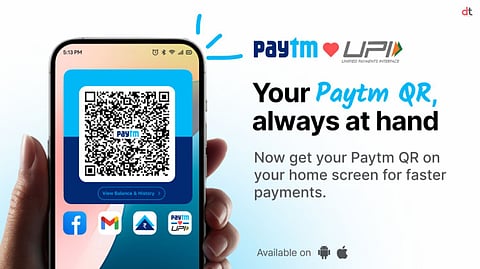

One97 Communications Limited (OCL), which owns the brand Paytm is the first to launch 'Receive Money QR Widget' for Android users. With this new innovative feature, users can quickly show the QR code for receiving money from their phone’s home screen itself, without having to open the Paytm app first.
After receiving a positive response from iOS users, Paytm has extended the 'Receive Money Paytm QR Widget' to Android. This widget enables seamless and faster payment collection directly from the home screen, simplifying the payment process for influencers, shopkeepers, freelancers, delivery partners, and small businesses.
Additionally, the company has launched a distinct coin-drop sound, providing a real-time notification of payments received. This instantly recognizable alert enhances the user experience and reinforces payment transparency. This innovation reflects Paytm’s commitment to continuously innovate based on user needs, offering greater convenience and confidence in mobile payments.
Paytm spokesperson said, "We are excited to introduce the 'Receive Money Paytm QR Widget' for Android users, making it easier and faster to collect payments directly from the smartphone home screen. Along with this, we have also introduced the coin-drop sound, providing an instantly recognizable alert when payments are received. This innovation reflects our commitment to continuously evolve based on user needs, ensuring a seamless and transparent payment collection process for both businesses and individuals alike."

Here’s a simple step-by-step guide on how to use the ‘Paytm QR Widget’ for receiving money on Android:
Open the Paytm app
Tap on your profile icon in the top left to open the flyout menu
Tap on the “Add QR to Homescreen” button below your QR code
Upon confirming, the QR widget will be added to your phone’s home screen
Once you close the Paytm app, you will see the QR widget on your home screen
Now, you can simply show the QR widget to receive money instantly, without needing to open the Paytm app the next time you need to receive payments
You will hear a coin-drop notification sound whenever someone makes a payment
Paytm offers user-centric innovations, allowing users to link their bank accounts, create UPI IDs, and make seamless self-account transfers, peer-to-peer transactions, and online and offline payments. It also provides UPI Lite for small-value transactions, RuPay Credit Card linking on UPI, and an auto-pay service, improving the overall payment experience. Expanding its global reach, Paytm now supports international UPI payments at locations where UPI is accepted, including the UAE, Singapore, France, Mauritius, Bhutan, Sri Lanka, and Nepal.
𝐒𝐭𝐚𝐲 𝐢𝐧𝐟𝐨𝐫𝐦𝐞𝐝 𝐰𝐢𝐭𝐡 𝐨𝐮𝐫 𝐥𝐚𝐭𝐞𝐬𝐭 𝐮𝐩𝐝𝐚𝐭𝐞𝐬 𝐛𝐲 𝐣𝐨𝐢𝐧𝐢𝐧𝐠 𝐭𝐡𝐞 WhatsApp Channel now! 👈📲
𝑭𝒐𝒍𝒍𝒐𝒘 𝑶𝒖𝒓 𝑺𝒐𝒄𝒊𝒂𝒍 𝑴𝒆𝒅𝒊𝒂 𝑷𝒂𝒈𝒆𝐬 👉 Facebook, LinkedIn, Twitter, Instagram
