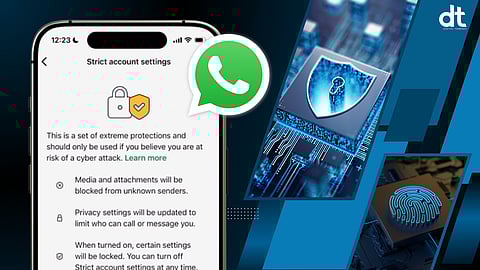

As digital communication becomes central to personal and professional life, the risks surrounding online privacy and security are growing rapidly. From phishing attempts to spyware attacks, cybercriminals are constantly evolving their methods. In response to these rising threats, WhatsApp has introduced a powerful new security feature called Strict Account Settings, designed to offer enhanced protection against highly sophisticated cyber attacks.
This new “lockdown-style” security mode adds another strong layer to WhatsApp’s existing end-to-end encryption, reinforcing the platform’s commitment to private and secure conversations.
Strengthening Privacy in a High Risk Digital Era
WhatsApp has long promoted secure messaging through default end-to-end encryption. This ensures that only the sender and receiver can read messages or hear calls. However, while encryption protects content, cyber attackers often try to exploit users through malicious files, unknown calls, and social engineering tactics.
Strict Account Settings aims to close these gaps by placing the account under highly restrictive security controls. The feature is especially designed for individuals who may face targeted attacks, such as journalists, business leaders, activists, and public figures. However, it can also benefit everyday users who want stronger protection.
What Is Strict Account Settings
Strict Account Settings is an advanced security mode that limits how unknown users can interact with your account. Once activated, it automatically applies the strongest privacy and safety controls available within WhatsApp.
To enable it, users need to follow this path:
Settings → Privacy → Advanced → Strict Account Settings
Activation requires setting up a separate six digit passcode, which is used to turn the feature on or off. This adds an extra verification layer to prevent unauthorized changes.
Key Benefits for Users
When Strict Account Settings is turned on, several protective measures are automatically applied.
1. Blocking Unknown Media and Files
All media and attachments from unknown contacts are blocked. This includes images, PDFs, APK files, and other formats often used in malware attacks. Even if a user clicks on such a file, it will not open, reducing the risk of infection.
2. Silent Unknown Calls
Calls from unknown numbers are automatically silenced. Users will not receive ringing notifications for such calls. Instead, they will appear only in the missed calls section. This prevents scam calls and harassment from disturbing users.
3. Stronger Group Privacy
With this mode enabled, strangers cannot add users to random groups without permission. This protects users from spam groups, fake investment schemes, and misleading community invites.
4. Automatic Detection of Suspicious Activity
If a number repeatedly sends suspicious or unwanted messages, WhatsApp can identify unusual behavior patterns and block such accounts automatically. This reduces exposure to persistent scammers.
5. Additional Account Protection Layer
Overall, Strict Account Settings acts as a security firewall around the account, limiting how outsiders can interact and reducing attack surfaces.
Are There Any Limitations
While the feature significantly boosts security, it may slightly affect performance.
Due to restricted background network activity, some users may notice minor changes in call quality or connection stability. This happens because the app prioritizes safety over speed when the mode is active.
For most users, this trade-off will be negligible. However, those who frequently make long calls may notice small differences.
Who Should Use This Feature
According to Meta, the parent company of WhatsApp, Strict Account Settings is primarily intended for users who face higher digital risks. This includes Journalists, Public figures, Corporate leaders, Political activists.
Content creators with large audiences
These individuals are more likely to be targeted by spyware, hacking attempts, and digital surveillance.
That said, the feature is equally useful for senior citizens and less tech-savvy users. Many elderly users accidentally open unknown files or join suspicious groups. Enabling this mode on their devices can help prevent financial fraud and data theft.
A Step Forward in Digital Safety
With Strict Account Settings, WhatsApp is moving beyond basic encryption and focusing on holistic account protection. Instead of reacting after an attack happens, the platform is now helping users prevent threats before they cause damage.
This approach reflects a growing understanding that modern cybersecurity is not only about protecting messages, but also about controlling access, behavior, and exposure.
How This Impacts Everyday Users
For regular users, this feature offers peace of mind. Once activated, there is no need to constantly worry about unknown calls, suspicious files, or unwanted group invitations. The app quietly filters out risks in the background.
It also reduces the chances of falling victim to popular scams, such as fake job offers, investment links, and phishing documents.
Final Thoughts
WhatsApp’s Strict Account Settings marks an important step in strengthening user safety in an increasingly complex digital environment. By offering a lockdown-style security mode, the platform is empowering users to take control of their privacy with just a few taps.
While it is especially valuable for high risk individuals, it can also serve as a strong protective tool for families, professionals, and senior citizens.
In a world where cyber threats are becoming more advanced every day, proactive security features like this are no longer optional. They are essential.
𝐒𝐭𝐚𝐲 𝐢𝐧𝐟𝐨𝐫𝐦𝐞𝐝 𝐰𝐢𝐭𝐡 𝐨𝐮𝐫 𝐥𝐚𝐭𝐞𝐬𝐭 𝐮𝐩𝐝𝐚𝐭𝐞𝐬 𝐛𝐲 𝐣𝐨𝐢𝐧𝐢𝐧𝐠 𝐭𝐡𝐞 WhatsApp Channel now! 👈📲
𝑭𝒐𝒍𝒍𝒐𝒘 𝑶𝒖𝒓 𝑺𝒐𝒄𝒊𝒂𝒍 𝑴𝒆𝒅𝒊𝒂 𝑷𝒂𝒈𝒆𝐬 👉 Facebook, LinkedIn, Twitter, Instagram
