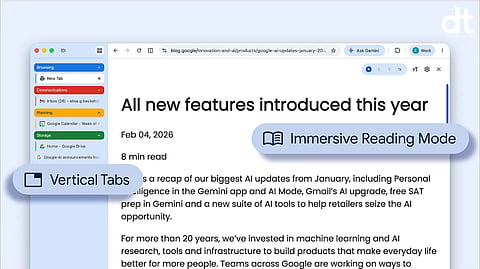

Google has begun rolling out two new features in Google Chrome designed to make browsing more organized, focused, and efficient. The update introduces vertical tabs and an improved reading mode, both aimed at helping users manage heavy browsing workloads and improve concentration while reading online content.
Vertical tabs bring better tab management and visibility
With the new vertical tabs option, users can now move their browser tabs from the top of the window to a side panel. This change allows each tab title to be displayed more clearly, making it easier to identify open pages at a glance.
To activate the feature, users can right click on any Chrome window and select the option labeled Show Tabs Vertically. Once enabled, tabs appear in a vertical layout along the side of the browser window.
This design is especially useful for users who keep many tabs open at once. By expanding the available space for tab titles, it reduces confusion, improves navigation, and helps prevent users from losing track of important pages during multitasking sessions.
Reading mode gets a cleaner and more focused experience
Chrome’s reading mode has also been upgraded with a more immersive and distraction free interface. Users can now open any supported webpage in reading mode by right clicking on the page and selecting Open in reading mode.
The feature removes unnecessary visual elements such as ads, sidebars, and complex layouts, leaving only the core text and essential visuals. This creates a cleaner reading environment that is easier on the eyes and better suited for long form content consumption.
The updated reading mode is designed for users who want to focus deeply on articles, reports, or study material without distractions from surrounding webpage elements.
Designed to improve productivity and focus
Together, vertical tabs and the enhanced reading mode aim to streamline everyday browsing. Vertical tabs improve organization for users handling multiple tasks at once, while reading mode supports focused content consumption.
Google continues to refine Chrome with features that respond to modern browsing habits, especially as users increasingly juggle research, work, entertainment, and communication across many open tabs.
With these updates, Chrome strengthens its position as a productivity focused browser that adapts to both multitasking and focused reading needs.
𝐒𝐭𝐚𝐲 𝐢𝐧𝐟𝐨𝐫𝐦𝐞𝐝 𝐰𝐢𝐭𝐡 𝐨𝐮𝐫 𝐥𝐚𝐭𝐞𝐬𝐭 𝐮𝐩𝐝𝐚𝐭𝐞𝐬 𝐛𝐲 𝐣𝐨𝐢𝐧𝐢𝐧𝐠 𝐭𝐡𝐞 WhatsApp Channel now! 👈📲
𝑭𝒐𝒍𝒍𝒐𝒘 𝑶𝒖𝒓 𝑺𝒐𝒄𝒊𝒂𝒍 𝑴𝒆𝒅𝒊𝒂 𝑷𝒂𝒈𝒆𝐬 👉 Facebook, LinkedIn, Twitter, Instagram
