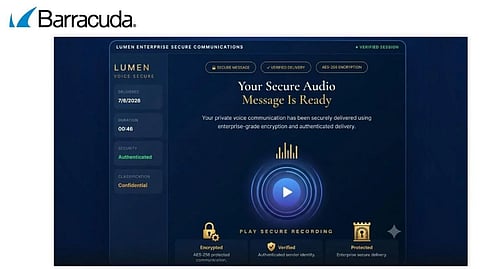

Researchers at Barracuda, the cyber resilience platform leader making security easy for all size businesses, have observed a wave of attacks that use a fake secure-voicemail notification, delivered by email with an HTML file attached. The attachment impersonates a trusted secure voicemail portal and relies only on HTML and CSS to persuade the recipient to click.
The email avoids the urgent language typical of many phishing campaigns. It concerns a routine business workflow rather than a password reset or invoice and asks the recipient to do one thing: open the attached HTML file. References to secure delivery, encrypted voicemail, and authenticated communication build trust and encourage the recipient to act.
The attack works when one opens the email, the attachment shows a convincing voicemail interface with security indicators and media controls. Encryption badges, delivery timestamps, recording duration, and waveform graphics make the page look authentic.
Rather than attaching hyperlinks to individual buttons, the attacker wrapped the entire page in a single <a> tag, as the HTML source shows:
<a class="page-link"
href="hxxps://_Ubteam_[.]coachjosuecosta[.]com/...">
<div class="container">
...
</div>
</a>
Whether the user clicks the Play button, the recording artwork, an information box, or an empty area, the result is the same: They are redirected to the attacker-controlled website. Every interaction therefore advances the campaign.
The HTML contains no JavaScript, Base64 content, HTML smuggling, command execution, obfuscation, or dynamic payload generation. The attackers rely solely on interface design and user behavior.
When the user clicks on the page, for example on the play button, the hidden hyperlink captures the interaction and redirects the browser to attacker-controlled external infrastructure. This loads an identity verification page that prompts the user for their credentials.
When researchers tested the sequence no subsequent credential-harvesting page was observed. However, the infrastructure and campaign design are consistent with phishing and could be changed to deliver credential theft or other malicious content.
If credentials were harvested, attackers could gain unauthorized access to accounts, misuse business email, and reach organizational resources.
“This campaign shows that an HTML attachment needs no JavaScript, exploit code, or obfuscation to create risk. HTML attachments should be treated as active content, and effective defense requires visibility across the full chain, including email delivery, attachment analysis, link inspection, redirect tracking, and infrastructure reputation”, added Aishwarya K, Threat Analysis Associate.
How organizations can defend against this threat
Inspect HTML attachments: Treat unexpected .html and .htm email attachments as active content.
Be wary of the whole page: In this campaign, any click leads to the attacker’s site, so avoid opening unexpected attachments
Use phishing-resistant authentication. Prioritize passkeys or FIDO2 security keys, alongside policies that restrict access according to device and sign-in risk.
Validate redirected URLs: Inspect the complete redirect chain.
Don't enter credentials via attachments: Use a trusted app or bookmark instead.
Report and investigate: Report suspicious attachments so associated indicators of compromise (IOCs) can be blocked.
𝐒𝐭𝐚𝐲 𝐢𝐧𝐟𝐨𝐫𝐦𝐞𝐝 𝐰𝐢𝐭𝐡 𝐨𝐮𝐫 𝐥𝐚𝐭𝐞𝐬𝐭 𝐮𝐩𝐝𝐚𝐭𝐞𝐬 𝐛𝐲 𝐣𝐨𝐢𝐧𝐢𝐧𝐠 𝐭𝐡𝐞 WhatsApp Channel now! 👈📲
𝑭𝒐𝒍𝒍𝒐𝒘 𝑶𝒖𝒓 𝑺𝒐𝒄𝒊𝒂𝒍 𝑴𝒆𝒅𝒊𝒂 𝑷𝒂𝒈𝒆𝐬 👉 Facebook, LinkedIn, Twitter, Instagram