
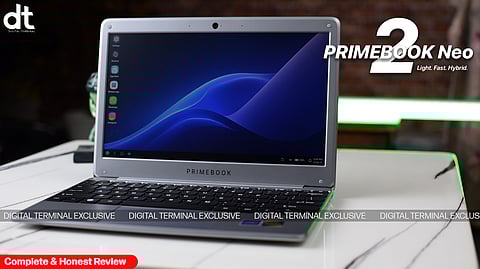
Product Review: Primebook 2 Neo (2025)
Digital Terminal Ratings(4 / 5)
Light, compact laptops running Android-based operating systems are emerging as a major category for learners who need simple, distraction-free computing without the complexity or cost of traditional Windows devices. The Primebook 2 Neo is one of the strongest examples of this trend. In this review, we break down its design, display, performance, AI capabilities, battery life, audio, connectivity, and overall value to see how well it serves its intended audience.
Design & Build Quality

From the first glance, the Primebook 2 Neo communicates its intentions clearly: it’s small, light, and easy to carry. Weighing just 1.1 kg and measuring under 12 inches, it’s extremely travel-friendly. Whether in a backpack, laptop bag, or your lap during a lecture, it never feels cumbersome. The matte gray finish gives it a neutral, understated look—no flashy branding, no unnecessary frills.
The chassis is plastic, but it feels solid enough for daily student use. The hinge has reasonable stiffness, and the keyboard deck is stable, making typing sessions comfortable for short to medium durations. It’s not premium, but it doesn’t feel cheap either. The focus is clearly on mobility and practicality, and in that regard, it succeeds.
Display Experience
The 11.6-inch HD IPS panel isn’t going to wow anyone accustomed to higher-end laptops, but it delivers a usable, consistent experience. Colors are decent, brightness is adequate for indoor use, and viewing angles are surprisingly forgiving. For online classes, e-books, research, and streaming video lectures, it performs reliably.
The HD resolution does limit sharpness, particularly for PDFs or web pages with dense text, but for its audience, it’s acceptable. It’s a screen that won’t distract, which ironically suits its purpose: lightweight learning without unnecessary frills.
Performance & AI Features
Under the hood, the MediaTek Helio G99 chipset surprises with its smooth handling of everyday Android workloads. Browsing, streaming, note-taking, and running educational apps all feel responsive. There is occasional lag when too many apps run simultaneously, but it never becomes a frustrating experience for typical student use.
The Primebook 2 Neo stands out for its AI-powered features:
AI Global Search allows users to search apps, files, settings, and even the web from a single interface, reducing the need to switch between menus.
AI Companion Mode reads on-screen content and provides real-time summaries, explanations, and context-aware insights. For students navigating dense PDFs, study notes, or online articles, this feature is genuinely useful.
Cloud PC Access enables streaming of desktop apps like VS Code, LibreOffice, GIMP, and Figma, effectively bypassing hardware limitations for light coding or design tasks.
Combined with 6GB of RAM and 128GB storage expandable to 512GB via microSD, the device punches above its weight for a student-focused laptop.
Software Experience (PrimeOS 3.0)
PrimeOS 3.0 keeps the experience light and approachable. It feels familiar to anyone who’s used Android but optimized for keyboard and touchpad use. Apps open quickly, navigation is intuitive, and the interface avoids the clutter common in budget Windows machines.
For students or casual users, it’s simple to adapt to. However, users who need advanced desktop software or complex workflows may find the OS limiting.
Battery Life & Charging
The Primebook 2 Neo is tuned for student-centric usage. Under a mix of browsing, streaming, and app-based tasks, it comfortably lasts a full day at school or university. The efficient Helio G99 chipset and HD screen resolution help keep power consumption low.
USB Type-C charging adds flexibility, allowing the use of common chargers and power banks. While it won’t compete with high-end ultrabooks in longevity, its battery performance aligns perfectly with its intended portable, on-the-go audience.
Keyboard, Trackpad, Audio & Connectivity
Typing on the Primebook 2 Neo is surprisingly comfortable given the small form factor. Key travel is adequate, feedback is predictable, and the layout works well for note-taking and writing. The trackpad is responsive and accurate for general navigation.
Speakers are adequate for video calls, lectures, and casual media consumption, though they lack depth and volume for music or movies. Connectivity options are strong: USB Type-C, two USB-A ports, a 3.5mm audio jack, a microSD slot, dual-band Wi-Fi, and Bluetooth 5.1. For a compact laptop, this is a generous set of ports that covers most needs without requiring adapters.
DT Verdict
The Primebook 2 Neo is a compact, lightweight, and practical laptop that delivers exactly what it promises for its target audience. Its AI-powered tools, smooth everyday performance, and cloud PC access make it a smart companion for students and casual users. While it won’t replace a full-fledged Windows laptop, it stands out in its segment as a reliable, portable, and intelligent device for learning, productivity, and on-the-go use.
Based on its overall design, features, and usability, we give the Primebook 2 Neo 3.5 stars out of 5. It’s a compelling choice for anyone seeking a simple, smart, and portable laptop in this segment.
𝐒𝐭𝐚𝐲 𝐢𝐧𝐟𝐨𝐫𝐦𝐞𝐝 𝐰𝐢𝐭𝐡 𝐨𝐮𝐫 𝐥𝐚𝐭𝐞𝐬𝐭 𝐮𝐩𝐝𝐚𝐭𝐞𝐬 𝐛𝐲 𝐣𝐨𝐢𝐧𝐢𝐧𝐠 𝐭𝐡𝐞 WhatsApp Channel now! 👈📲
𝑭𝒐𝒍𝒍𝒐𝒘 𝑶𝒖𝒓 𝑺𝒐𝒄𝒊𝒂𝒍 𝑴𝒆𝒅𝒊𝒂 𝑷𝒂𝒈𝒆𝐬 👉 Facebook, LinkedIn, Twitter, Instagram
