
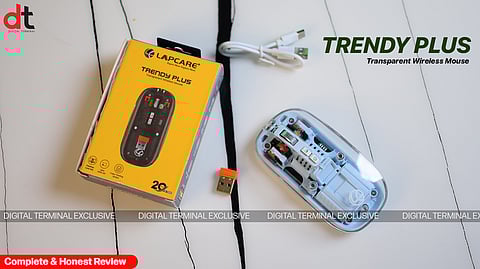
Product Review: Lapcare Trendy Plus LWM-801 Wireless Mouse
Digital Terminal Ratings(4.5 / 5)
In today’s crowded market of wireless peripherals, finding a budget-friendly mouse that balances performance, comfort, and versatility isn’t easy. The Trendy Plus LWM-801 enters the scene promising a lot for its sub-₹800 price tag. But how well does it actually perform in everyday use? We tested it across multiple devices and work scenarios to see if it lives up to its feature list and more importantly, if it’s worth your time and money.

Design & Build: Lightweight and Modern, But Not Premium
Right out of the box, the LWM-801 makes a good visual impression. The design is minimal and modern, with a matte finish that doesn’t attract fingerprints easily. It looks smart enough to sit next to a premium laptop or desktop without standing out awkwardly.
But in hand, the story shifts slightly. The ABS plastic build feels very lightweight — just 66 grams — which is great for portability, but it doesn’t inspire much confidence in terms of durability. This mouse is clearly built for mobility, not rugged daily abuse. That said, the buttons are well placed and the scroll wheel has a nice tactile feel.
Connectivity: Triple Mode That Actually Works
One of the best features here is the versatile connectivity. You can use:
2.4GHz Wireless with the included USB dongle (plug-and-play),
Bluetooth 3.0 for older devices, and
Bluetooth 5.2 for newer laptops, tablets, or smartphones.
Switching between devices is easy using the selector switch underneath. We connected it to a Windows laptop, an Android tablet, and even an iPhone — and all three paired quickly and stayed connected without lag. For multitaskers or users juggling between a work laptop and a tablet, this is a major plus.
Performance & Productivity: More Than Just Basic
Despite its price, the cursor tracking is solid, and the DPI button allows switching up to 2400 DPI, which is more than sufficient for day-to-day tasks like browsing, document editing, or light creative work. It's not meant for hardcore gamers or detailed graphic design — but for normal office productivity, it holds its own.
The standout productivity feature is the dedicated copy-paste button located on the side. While it's a bit of an acquired taste (and you'll need to train your muscle memory), it genuinely speeds up repetitive tasks — especially when working on spreadsheets, emails, or web content.
The silent click technology deserves special mention. The buttons are impressively quiet — almost inaudible — making it perfect for quiet office environments, libraries, or late-night work sessions at home.
Battery & Charging: Type-C FTW
A big win for the LWM-801 is the 400mAh rechargeable battery, which comfortably lasted us nearly five days of regular usage on a single charge. And when it runs out, you’re not stuck searching for outdated cables — the Type-C charging port ensures you can plug it in using your phone charger. Charging is quick too. A 10–15 minute top-up gave us enough juice for an entire workday. It’s a user-friendly touch that many budget mice lack.
Ergonomics: Compact, Not Cramped
Comfort-wise, the mouse has a low-profile ergonomic shape that works well for small to medium hands. It’s designed to be compact, so it naturally caters more to mobile users or those who don’t prefer bulky designs.
However, if you’re someone with larger hands or you use a mouse for extended hours, you might find this a bit too small after a while. It’s not uncomfortable, but it’s also not designed for long-duration professional editing or design sessions.
Digital Terminal Verdict
The Trendy Plus LWM-801 is a classic case of a budget product that exceeds expectations where it matters most. With multi-device wireless connectivity, silent operation, a dedicated productivity button, and modern Type-C charging, it ticks all the essential boxes for students, remote workers, and casual users. It’s not a performance powerhouse or a gaming companion, but it doesn’t claim to be. For under ₹750, you’re getting a genuinely usable, thoughtfully designed wireless mouse that just works. That, in our book, is a win. Based on its performance, we give it 4 stars out of 5.
𝐒𝐭𝐚𝐲 𝐢𝐧𝐟𝐨𝐫𝐦𝐞𝐝 𝐰𝐢𝐭𝐡 𝐨𝐮𝐫 𝐥𝐚𝐭𝐞𝐬𝐭 𝐮𝐩𝐝𝐚𝐭𝐞𝐬 𝐛𝐲 𝐣𝐨𝐢𝐧𝐢𝐧𝐠 𝐭𝐡𝐞 WhatsApp Channel now! 👈📲
𝑭𝒐𝒍𝒍𝒐𝒘 𝑶𝒖𝒓 𝑺𝒐𝒄𝒊𝒂𝒍 𝑴𝒆𝒅𝒊𝒂 𝑷𝒂𝒈𝒆𝐬 👉 Facebook, LinkedIn, Twitter, Instagram
