
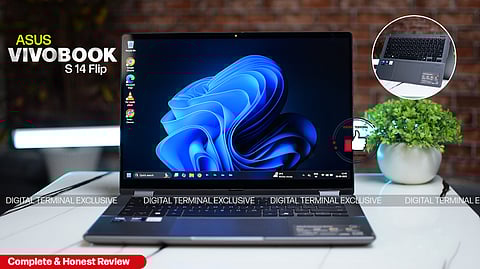
Product Review: ASUS Vivobook 14 Flip (2025)
Digital Terminal Ratings(4.5 / 5)
Convertible laptops are becoming increasingly popular among students, professionals, and casual creators who need a device that can adapt to different tasks and environments. The Vivobook 14 Flip is a 2-in-1 model that combines standard laptop functionality with tablet-like versatility. In this review, we examine its design, display, performance, AI features, battery, audio, and connectivity to give a comprehensive overview of its capabilities.
Design & Build Quality

Convertible laptops are often judged by how well they balance portability with durability, and the Vivobook 14 Flip manages this quite well. The matte gray finish keeps it professional, while the 360° hinge feels sturdy and transitions smoothly between laptop, tent, stand, and tablet modes.
At 1.57 kg, it isn’t ultra-light, but it remains easy enough to carry around daily. The military-grade durability certification adds confidence that it can handle routine bumps and travel. In tablet mode, however, it still feels like a folded laptop rather than a true tablet, so ergonomics are not as seamless as a dedicated slate.
Display Experience
For most students and professionals, display quality makes or breaks the experience, since long hours are spent working or watching content. The ASUS Vivobook’s 14-inch WUXGA OLED touchscreen is easily one of its strongest features. Colors look rich, contrast is excellent thanks to true blacks, and HDR content really stands out. The taller 16:10 aspect ratio also makes browsing and document work easier than traditional 16:9 screens.
The 60Hz refresh rate is optimized for smooth everyday use, ensuring crisp and fluid visuals for web browsing, streaming, presentations, and general workflow tasks. Combined with responsive touch input and stylus support, the display provides an immersive, engaging, and versatile experience that caters to both creative and professional needs.
Performance & AI Features
The Vivobook 14 Flip runs on Intel’s latest Core Ultra 7 processor, paired with Intel Arc graphics and an integrated AI NPU. Day-to-day performance feels snappy and reliable, whether juggling multiple apps, streaming, or working with documents. The inclusion of AI acceleration brings real-world benefits, as features like transcription, content summarization, and smart image edits run locally and efficiently.
Adding to that, Microsoft Copilot is built right in, offering quick assistance through a dedicated key. From drafting documents and generating ideas to helping with searches and summarizing content, Copilot feels like a productivity partner always within reach. It blends seamlessly into workflows, making the laptop feel more intelligent and user-friendly.
The Vivobook also supports storage upgrades via a M.2 2280 PCIe 4.0x4 slot, giving users flexibility to expand beyond the standard 512GB SSD when needed. With 16GB of fast LPDDR5X memory, multitasking is smooth, and the device feels responsive even under heavier workloads.
Battery & Charging
Battery life is often a deciding factor in choosing a portable 2-in-1, and the Vivobook performs well here. The 70Wh battery comfortably lasts a full workday with mixed usage, typically around 12–14 hours. ASUS claims up to 28 hours, but that’s only under very light workloads. Even so, it’s among the better options in this category.
Charging is equally practical, with USB-C fast charging topping up around 60% in under an hour. For students and professionals who move between classes or meetings, this helps reduce charging anxiety.
Keyboard, Touch, and Pen Input
The ASUS Vivobook 14 Flip offers an exceptional typing and touch experience, perfectly suited for both productivity and creativity. The keyboard features 1.7mm key travel, providing comfortable and responsive feedback during long typing sessions, making it ideal for extended work, note-taking, or writing projects. The precision touchpad is smooth and accurate, allowing effortless navigation and multitasking across applications.
The touchscreen is highly responsive to finger input, enhancing interactivity in tablet, tent, and stand modes. Stylus support further elevates the experience, making it simple and enjoyable to take notes, annotate documents, or sketch ideas with precision.
Audio & Webcam
Good audio and webcam quality have become essential with the rise of video calls and online classes. The Dolby Atmos speakers on this machine are clear enough for meetings and media, though they lack real punch for music or movies at high volume. The adaptive audio feature that adjusts depending on the laptop’s orientation does work as intended, which is a nice touch in convertible use.
The FHD IR camera is another strength. It delivers clear video and supports Windows Hello facial recognition for quick logins. The physical privacy shutter adds peace of mind for security-conscious users.
Connectivity
A modern laptop also needs strong connectivity options, and the Vivobook doesn’t disappoint here. Between Thunderbolt 4, USB-C, USB-A, HDMI 2.1, a headphone jack, and a microSD slot, it covers most needs. On the wireless side, Wi-Fi 7 and Bluetooth 5.4 make the device ahead of its time, though not everyone will benefit immediately since Wi-Fi 7 routers are still rare. Still, it’s solid future-proofing.
Price & Availability
Priced starting at ₹86,990, the ASUS Vivobook 14 Flip is readily available across major platforms including Flipkart, Amazon, and the official ASUS website, making it easy to purchase and access customer support and warranty services.
DT Verdict
The ASUS Vivobook 14 Flip is a versatile 2-in-1 that gets a lot of things right especially its OLED display, excellent battery life, and future-ready AI features. It’s a great choice for students, professionals, and casual creators who want a device that adapts to different roles throughout the day.
The compromises are clear though: refresh rate, integrated graphics, and the lack of upgradeability hold it back from being the perfect all-rounder. At ₹86,990, the value depends on whether the AI-powered features and OLED screen are priorities. For those who want flexibility, endurance, and a taste of next-gen AI in one package, it’s a smart pick but power users may want to look elsewhere.
𝐒𝐭𝐚𝐲 𝐢𝐧𝐟𝐨𝐫𝐦𝐞𝐝 𝐰𝐢𝐭𝐡 𝐨𝐮𝐫 𝐥𝐚𝐭𝐞𝐬𝐭 𝐮𝐩𝐝𝐚𝐭𝐞𝐬 𝐛𝐲 𝐣𝐨𝐢𝐧𝐢𝐧𝐠 𝐭𝐡𝐞 WhatsApp Channel now! 👈📲
𝑭𝒐𝒍𝒍𝒐𝒘 𝑶𝒖𝒓 𝑺𝒐𝒄𝒊𝒂𝒍 𝑴𝒆𝒅𝒊𝒂 𝑷𝒂𝒈𝒆𝐬 👉 Facebook, LinkedIn, Twitter, Instagram
